
All of Ordissimo's intelligence, at your fingertips:
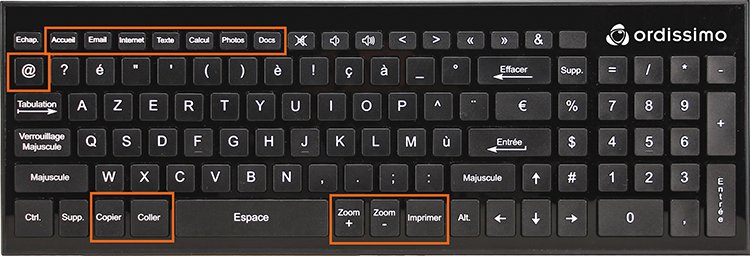
The main apps at the touch of a finger!
The "Home", "Mail", "Internet", "Write", "Calculate", "Photos", "Documents" and "Contacts" shortcuts are right at the top of your keyboard. You do not need your mouse to move between the different functions of your Ordissimo!
Shortcuts that save you time
To make the text on the screen bigger, just press the zoom keys. Whatever app they are in, users can enlarge or reduce the text as they like. No more trouble with glasses!
Much more natural than "Ctrl C" or "Ctrl V": a "Copy" key and a "Paste" key are built into every one of our keyboards! Want to print? Press the "Print" key.
Only one function per key
Is it natural to press "Shift" and "2" just to type a quotation mark? Is it natural to press "Alt Gr" and "4" to type the euro sign?
We don't think so! That is why every Ordissimo keyboard has only one function per key, with no risk of getting it wrong!
The functions of the keys are written in full: "Delete" or "Enter", for example.